
Access Control System Architecture
The chosen access control system architecture determines how credentials are authenticated, doors are controlled, events are recorded and users are managed. Different architectures provide varying levels of scalability, resilience, operational capability and integration. The selected solution should support both current operational requirements and future organisational growth.
Standalone Access Control Systems
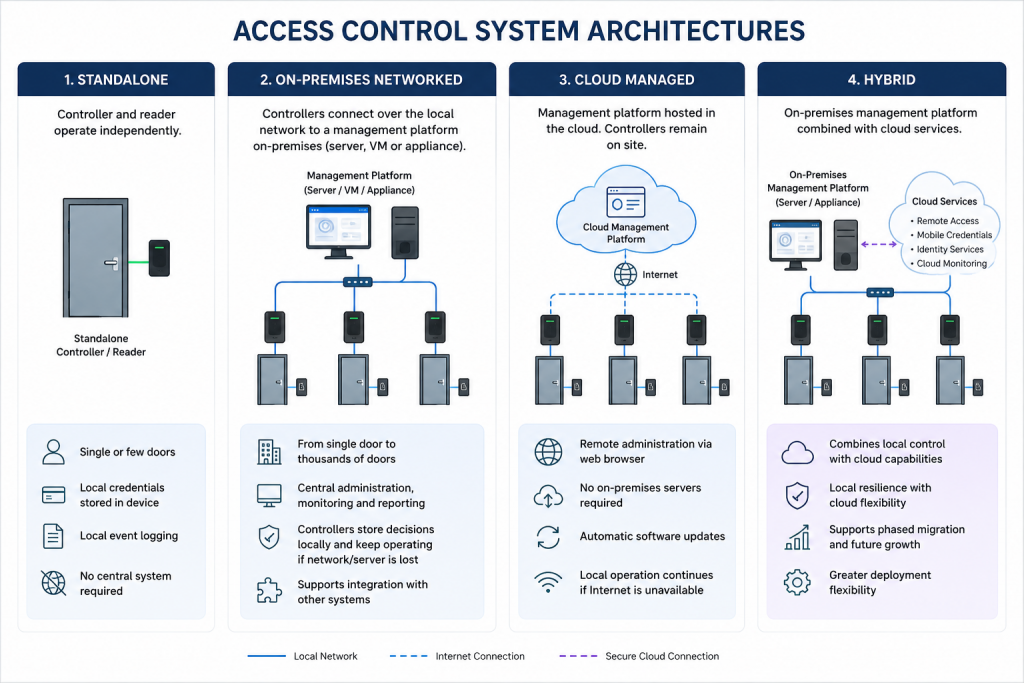
Standalone systems comprise a controller integrated within or directly connected to a single reader, managing one or more doors independently without a central management platform. User credentials, access permissions and event logs are stored locally, making these systems suitable for simple installations with minimal administration requirements.
On-Premises Networked Access Control Systems
On-premises networked systems utilise one or more intelligent door controllers connected to a central management platform over the local network. The management platform may be software installed on a server, virtual machine or dedicated appliance, allowing central administration, monitoring, reporting and integration while controllers continue making local access decisions.
Cloud Managed Access Control Systems
Cloud managed systems host the management platform within a secure cloud environment while controllers remain installed on site. Administration, monitoring and reporting are performed through a web browser without requiring dedicated on-premises management servers.
Hybrid Cloud Access Control Systems
Hybrid cloud systems combine a traditional on-premises enterprise platform with cloud-based services such as remote administration, monitoring, identity management or mobile credentials. This approach allows organisations to adopt cloud capabilities while retaining local resilience and operational autonomy.
Typical Applications
| Architecture | Typical Applications |
|---|---|
| Standalone | Single doors, small offices, plant rooms, utility buildings, retail units and temporary installations. |
| On-Premises Networked | Commercial offices, schools, healthcare, industrial sites, multi-building campuses and enterprise estates of any size. |
| Cloud Managed | Small and medium-sized businesses, retail chains, education, distributed organisations and sites with limited on-site IT infrastructure. |
| Hybrid Cloud | Multi-site organisations, enterprise estates, critical infrastructure and organisations adopting cloud services while retaining local infrastructure. |
Advantages & Disadvantages of Access Control Systems
| Architecture | Advantages | Disadvantages |
|---|---|---|
| Standalone | Low cost, simple installation, minimal infrastructure and straightforward maintenance. | Limited scalability, no central administration, restricted reporting and limited integration capabilities. |
| On-Premises Networked | Central administration, scalable, extensive integration capabilities, local decision making and full control of infrastructure. | Requires on-site management infrastructure, greater deployment complexity and ongoing maintenance responsibilities. |
| Cloud Managed | Reduced on-site infrastructure, simplified deployment, automatic software updates, remote administration and predictable subscription model. | Internet dependency for management functions, recurring subscription costs and reduced control over the hosting environment. |
| Hybrid Cloud | Combines local resilience with cloud services, supports phased migration, enables remote management and balances operational flexibility with business continuity. | More complex architecture, mixed licensing models and increased administration compared with purely on-premises or cloud deployments. |
Failure Modes
Understanding how an access control system behaves during equipment, network or power failures is an important part of the design process. The selected architecture should ensure that any loss of functionality is proportionate to the operational risk and does not compromise life safety or business continuity.
A standalone controller may only affect a single door if it fails, whereas a networked controller failure could impact multiple controlled doors. If communication between controllers and the management platform is lost, intelligent controllers should continue enforcing locally stored access permissions until communications are restored. Cloud-managed systems typically continue controlling doors locally during Internet outages, although central administration, monitoring and reporting may be temporarily unavailable. Designers should also consider the impact of server failures, database corruption, network outages and power interruptions when determining the appropriate level of resilience.
Whole-Life Cost
The initial purchase price represents only a proportion of the total cost of an access control system. Design decisions should consider the expected operational life of the system and the ongoing costs associated with ownership, maintenance and future expansion.
Whole-life costs may include:
- Software licensing and subscription fees.
- Server or cloud hosting costs.
- Credential production and replacement.
- Hardware replacement and technology refresh.
- Firmware and software updates.
- Preventative maintenance and technical support.
- Expansion to accommodate additional doors or users.
- Staff training and system administration.
- Cyber security and compliance requirements.
The most appropriate architecture the one that best satisfies the operational requirements while providing an appropriate balance between functionality, resilience, maintainability and long-term value.
Authentication & Authorisation
An access control system must first verify the identity of a user before determining whether they should be granted access. The chosen authentication method should provide an appropriate balance between security, convenience, operational efficiency and cost, while the authorisation strategy should ensure users can only access the areas they are permitted to enter.
Authentication Methods
| Authentication Method | Typical Security | User Convenience | Throughput | Typical Applications |
|---|---|---|---|---|
| PIN Code | ● | ●● | ●●● | Internal offices, low-risk areas, temporary access. |
| RFID Credentials | ●● | ●●● | ●●● | General commercial access control, education, healthcare and industrial facilities. |
| Smart Cards | ●●● | ●●● | ●●● | Enterprise organisations, government, critical infrastructure and multi-site estates. |
| Mobile Credentials | ●●● | ●●● | ●●● | Modern workplaces, flexible working environments and organisations seeking simplified credential management. |
| Biometric Authentication | ●●● | ●● | ●● | High-security areas, data centres, laboratories and critical infrastructure. |
| ANPR | ●● | ●●● | ●●● | Vehicle entrances, logistics facilities, business parks and secure compounds. |
| QR / Barcode | ● | ●● | ●● | Visitor management, temporary access, events and contractor access. |
| Multi-Factor Authentication | ●●● | ● | ● | High-security environments where two or more authentication methods are required before access is granted. |
Design Considerations
When selecting an authentication method, designers should consider:
- Required level of security.
- Operational convenience.
- User throughput.
- Environmental conditions.
- Credential management.
- Privacy requirements.
- Whole-life cost.
Authorisation Strategy
Authentication confirms who the user is. Authorisation determines what they are permitted to access.
The authorisation strategy should be defined before hardware selection and should reflect the organisation’s operational requirements and security policy.
Design Considerations
- User groups and roles.
- Security zones.
- Time-based access permissions.
- Visitor and contractor access.
- Temporary and emergency access.
- Least privilege.
- Multi-factor authentication requirements.
- Anti-passback.
- Lockdown procedures.
- Audit and reporting requirements.
Effective access control systems are built around well-defined access policies rather than hardware capabilities. A clear authorisation strategy ensures users can move efficiently throughout the organisation while preventing unauthorised access to sensitive areas.
Building System Resilience in Access Control Systems
Access control systems should continue to protect people, assets and facilities during equipment failures, network outages and power interruptions. The level of resilience should be proportionate to the operational risk, recognising that different doors and areas may require different levels of availability and fault tolerance.
Design Considerations
Controller Resilience
Modern intelligent controllers should continue enforcing locally stored access permissions if communication with the management platform is lost. This ensures that authorised users can continue to access permitted areas while maintaining security until communications are restored.
Power Resilience
Controllers, power supplies and locking hardware should remain operational during short-term power failures where continued operation is required. Battery backup, UPS systems and appropriate power distribution should be considered for critical access points.
Communications Resilience
The failure of a network connection should not unnecessarily prevent authorised access. Consider the impact of network outages, remote site communications and controller connectivity when determining the required level of resilience.
Server & Database Resilience
Where an on-premises management platform is used, designers should consider the resilience of management servers, databases and virtual infrastructure. Redundant servers, virtualisation and regular backups may be appropriate for larger or business-critical deployments.
Locking Strategy
The selected locking hardware should fail safely or fail securely, depending on the operational requirement, life safety obligations and security risk associated with each access point.
Single Points of Failure
Critical access routes should be reviewed to identify components whose failure could prevent access or compromise security. Designers should minimise unnecessary single points of failure through appropriate system architecture and equipment selection.
Business Continuity
The required level of resilience should reflect the operational impact of system failures. High-security or business-critical environments may require greater redundancy, enhanced monitoring and formal disaster recovery procedures than lower-risk installations.
Best Practice
- Design resilience in proportion to operational risk.
- Ensure controllers can operate autonomously during communication failures.
- Provide resilient power for critical controllers and locking hardware.
- Minimise single points of failure where practical.
- Consider the operational impact of failures before selecting the system architecture.
- Verify resilience requirements during commissioning and acceptance testing.
Lifecycle Considerations
An access control system should be designed to remain secure, reliable and manageable throughout its operational life. Anticipating organisational growth, evolving security requirements and changes in authentication technologies can significantly reduce future upgrade costs and operational disruption.
Design Considerations
Future Expansion
The system should be designed to accommodate additional doors, controllers, users, buildings and sites without requiring significant architectural changes. Sufficient capacity should be considered for controller expansion, software licensing and supporting infrastructure.
Authentication Technologies
Credential technologies continue to evolve, with many organisations transitioning from traditional proximity cards to smart cards, mobile credentials or biometric authentication. Selecting systems that support multiple authentication methods can simplify future technology adoption.
User & Credential Management
Organisational growth, staff turnover and changes in operational requirements should be considered when designing the user management strategy. Efficient credential administration and role-based access control can reduce the ongoing administrative burden.
Software & Firmware Lifecycle
Management software, controller firmware and authentication devices should be maintained throughout their operational life to provide new functionality, improve reliability and address cyber security vulnerabilities. Designers should consider how updates will be deployed with minimal disruption to day-to-day operations.
Integration Readiness
Future integration with CCTV, visitor management, intercom, intruder detection, lift control, HR systems and PSIM platforms should be considered where appropriate, even if these systems are not included within the initial project scope.
Documentation
Accurate as-built drawings, controller schedules, door schedules, network information, configuration records and user documentation simplify maintenance, fault diagnosis and future expansion.
Whole-Life Cost
The total cost of ownership extends beyond the initial installation and includes software licensing, hardware replacement, credential management, technical support, maintenance, training and future system expansion. Design decisions should balance operational capability with long-term value.
Best Practice
- Design for future expansion rather than current requirements.
- Select authentication technologies that support future migration.
- Maintain accurate documentation throughout the system lifecycle.
- Consider future integration opportunities during the initial design.
- Evaluate whole-life cost rather than initial purchase price alone.
- Periodically review the system to ensure it continues to meet the organisation’s operational and security requirements.
For guidance on managing Access Control Systems throughout their operational life, see Security Design Process – Lifecycle Management